
AnythingLLM vs Jan: two open-source local AI apps, built for different jobs
Jan is a clean, open-source ChatGPT replacement. AnythingLLM is an open-source AI workspace. If your work lives in documents, meetings, and recurring tasks, here is how they differ.
Updated October 2026Jan and AnythingLLM have a lot in common. Both are free, both are open source, both run local models on macOS, Windows, and Linux, and both are built by teams who believe you should own your AI. If you are choosing between them, you are already making a good choice.
The difference is in what each is built to do. Jan is a clean, focused replacement for the ChatGPT app: pick a model, chat, connect some tools. AnythingLLM is a workspace for getting work done with AI, built around your documents, your meetings, and tasks that run in the background, and it scales from one laptop to a whole team.
Jan vs AnythingLLM
| Feature | AnythingLLM | Jan |
|---|---|---|
| Open source | MIT core | Apache 2.0 |
| Price | Free | Free |
| Run local models | Built-in engine (llama.cpp) | llama.cpp and MLX |
| Cloud providers | 40+ | OpenAI, Anthropic, Gemini, Groq, Mistral, OpenRouter, and more |
| MCP tools | Yes | Yes |
| Web search | Yes | Yes, since v0.8.4 |
| OpenAI-compatible local API | Yes | Yes |
| Persistent document workspaces | Vector database, citations, pinning | File uploads in Projects |
| Data connectors | GitHub, GitLab, YouTube, Confluence, Obsidian, websites | No |
| No-code agent builder | Agent Flows | No |
| Meeting transcription and notes | On-device | No |
| System-wide dictation and autocomplete | Magic Echo and Magic Tab | No |
| Multi-user team server | Self-host with Docker, or hosted | No |
Built around your documents
Jan added file uploads to Projects in 2025, and long-standing community requests ask for deeper multi-document retrieval. AnythingLLM was built around document chat from day one.
Each AnythingLLM workspace has its own documents, embedded into a local vector database. Every chat in that workspace retrieves the relevant passages and shows its sources. You can pin documents that must always be in context, sync content from GitHub, GitLab, YouTube, Confluence, Obsidian, and website crawls, and pick your embedding model and vector database. PDFs, Office files, EPUBs, images (through OCR), and audio and video (through transcription) all work.
Agents that keep working
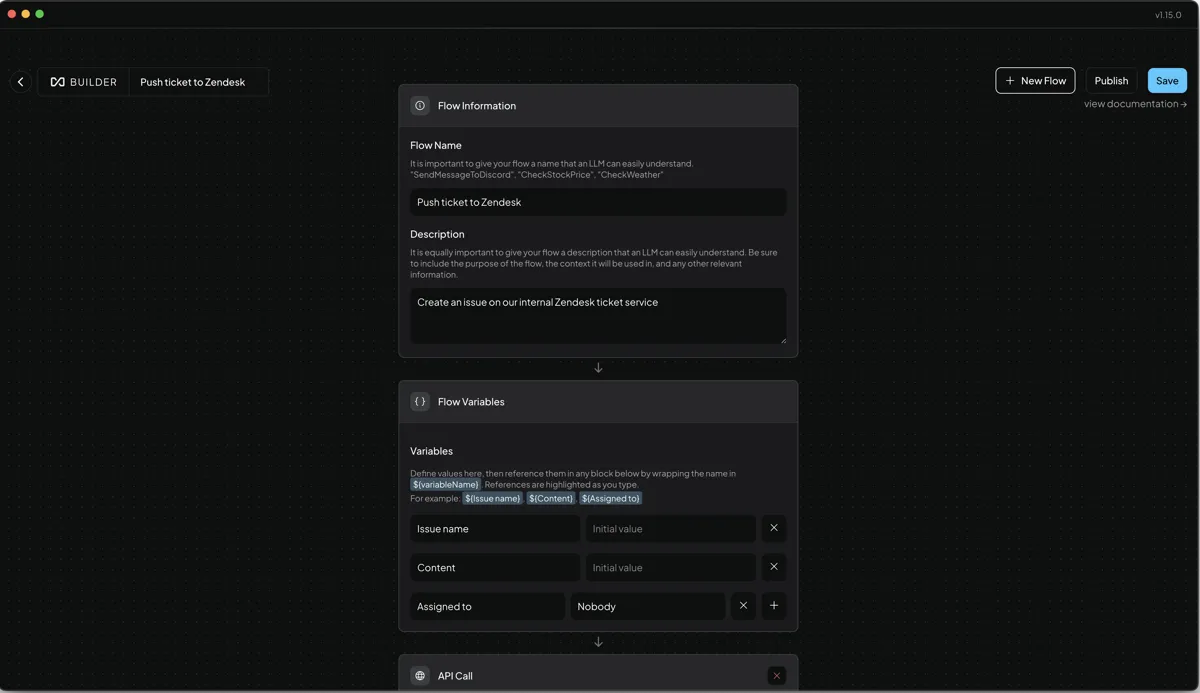
Both apps support MCP. AnythingLLM adds a full agent layer around it: built-in skills for web scraping, file system access, charts, SQL, Gmail, Google Calendar, Outlook, and creating Office documents, plus Agent Flows to build your own skills visually. Scheduled jobs run those agents in the background on a timer, so a daily brief or weekly report just shows up.
Beyond the chat window
AnythingLLM also covers the parts of your day that are not a conversation. The Meeting Assistant records any call without a bot and transcribes and summarizes it on your machine. Magic Echo turns your voice into clean text in any app, Magic Beacon lets you highlight text anywhere and ask about it, and Magic Tab gives you context-aware autocomplete everywhere. These run on macOS and Windows. The Magic features are free with a daily allowance, and Pro removes the limits.
From one laptop to a team
Jan is a personal app. AnythingLLM runs the same experience as a multi-user server with admin controls, permissions, and white-labeling, free to self-host, or as a hosted private instance. And AnythingLLM Mobile for Android pairs with your desktop or server by QR code.
When Jan is the better fit
If you want a minimal, fast chat app, need MLX on a Mac, or like experimenting with Menlo Research's own Jan models, Jan is a great choice. If you can, try both. You can even point AnythingLLM at Jan's local API server through the Generic OpenAI provider.
If your work lives in documents and meetings, download AnythingLLM. It is free, open source, and set up in minutes.
Frequently asked questions
›Is AnythingLLM better than Jan?
They are aimed at different jobs. Jan is a lightweight, open-source chat app for local and cloud models. AnythingLLM is a fuller workspace: persistent document knowledge bases, agents and agent flows, scheduled jobs, a meeting assistant, a mobile app, and a self-hosted server for teams. If you mostly chat, Jan is great. If you work with documents and recurring tasks, AnythingLLM does more.
›Can AnythingLLM use Jan as a backend?
Jan exposes an OpenAI-compatible server, and AnythingLLM has a Generic OpenAI provider for exactly that kind of endpoint. Most people do not need it, since AnythingLLM has its own built-in engine.
›Are both Jan and AnythingLLM free?
Yes. Both are free desktop apps for macOS, Windows, and Linux. AnythingLLM has an optional Pro subscription that removes daily limits on its Magic Echo, Magic Beacon, and Magic Tab features.