
AnythingLLM vs Ollama: everything Ollama runs, plus everything it doesn't do
AnythingLLM's built-in engine is powered by Ollama. So the real question is not Ollama or AnythingLLM. It is whether you want Ollama by itself, or Ollama with documents, agents, and a real desktop app around it.
Updated October 2026Ollama made running a local model a one-line command, and it has become the default engine behind a huge part of the local AI world. We are fans. In fact, the built-in model engine inside AnythingLLM Desktop is powered by Ollama.
So this is not really an "Ollama versus AnythingLLM" story. Ollama is an excellent engine. AnythingLLM is the app around it: the place your documents live, where your agents run, where your meetings get transcribed, and where you actually get work done. You can use AnythingLLM's built-in engine and never install Ollama separately, or point AnythingLLM at the Ollama you already run.
Ollama by itself vs Ollama inside AnythingLLM
| Feature | AnythingLLM | Ollama app |
|---|---|---|
| Run local models | Built-in Ollama-powered engine, or your own Ollama | Yes |
| Desktop app on Linux | AppImage | No. The GUI is macOS and Windows only |
| Chat with a file | Yes | Yes |
| Persistent document knowledge base | Workspaces with a local vector database | No |
| Citations and source viewer | Yes | No |
| Data connectors | GitHub, YouTube, Confluence, Obsidian, websites | No |
| Web search | On by default, no API key | Via Ollama account and web search API |
| Agents and MCP tools | Yes | Through third-party tools |
| No-code agent builder | Agent Flows | No |
| Scheduled background jobs | Yes | No |
| Meeting transcription and notes | On-device | No |
| Mix local and cloud models | 40+ providers, plus automatic model routing | Ollama Cloud models ($20–$500/mo plans) |
| Multi-user team server | Self-host with Docker, or hosted | No |
| Price | Free | Free locally; paid cloud plans |
Your documents, indexed and cited
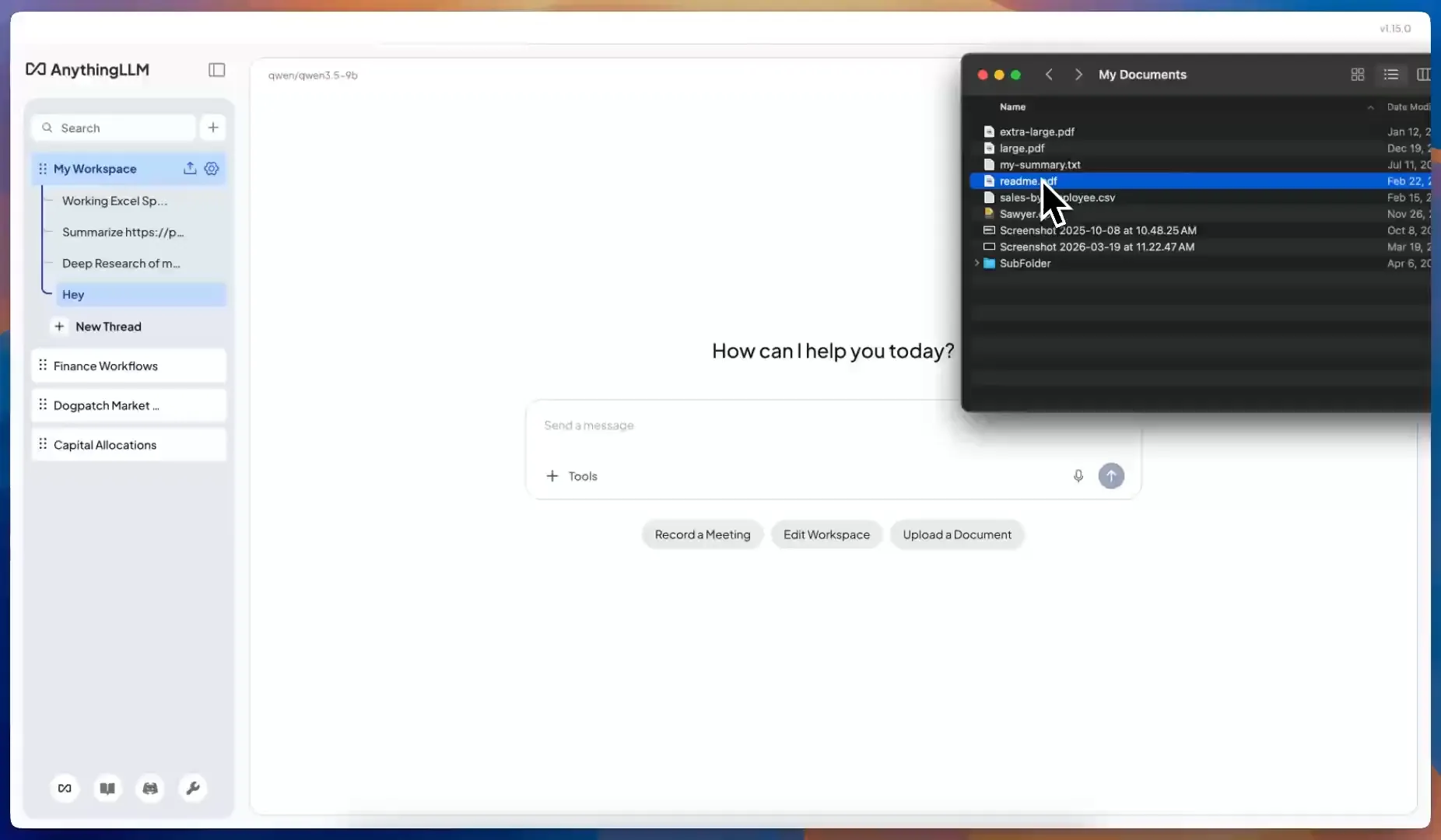
The Ollama app lets you drop a file into a chat, and the text goes into the context window for that conversation. That is fine for a single short document. It falls apart with a folder of contracts, a codebase, or a year of meeting notes, because there is no index, no persistence, and no way to see where an answer came from.
AnythingLLM gives every project a workspace. Documents you add are split, embedded, and stored in a local vector database on your machine (LanceDB by default, or Chroma, Qdrant, PGVector, Milvus and others). Every chat in that workspace retrieves the relevant passages and cites them. You can pin documents, re-embed with a different model, and pull in GitHub repos, YouTube transcripts, Confluence spaces, Obsidian vaults, and whole websites.
Ollama is a great embedding server, too. Choose Ollama as AnythingLLM's embedder and your local Ollama model does the indexing.
Agents and tools, built in
Ollama's answer to agents is to plug it into other tools. AnythingLLM is one of those tools, so you get it all in one place:
- Built-in agent skills for web search, web scraping, reading and writing files, charts, SQL databases, Gmail, Google Calendar, Outlook, and generating Word, PowerPoint, Excel, and PDF files.
- MCP support over stdio, SSE, and streamable HTTP, with per-tool toggles.
- Agent Flows to build your own skills without code.
- Scheduled jobs that run agents in the background on a timer.
Web search is on from your first chat, with You.com as the default provider and no API key to set up.
A real app on every desktop
Ollama's desktop app arrived in July 2025 and is intentionally minimal. It also is not available on Linux, where Ollama remains a command-line tool. AnythingLLM Desktop runs on macOS (Apple Silicon and Intel), Windows (x64 and ARM64), and Linux, and adds the things you do outside a chat window:
- A Meeting Assistant that records any call without a bot and transcribes, labels speakers, and summarizes it on your machine.
- Magic Echo dictation, Magic Beacon for highlighted text, and Magic Tab autocomplete in any app.
- A model router that switches models automatically based on rules, even mid-conversation.
- AnythingLLM Mobile for Android, which pairs with your desktop.
Meeting Assistant and the Magic features are available on macOS and Windows. The Magic features are free with a daily allowance; Pro removes the limits.
Already run Ollama? Keep it.
AnythingLLM connects to an existing Ollama install in seconds:
- Make sure Ollama is running (it listens on
127.0.0.1:11434by default). - In AnythingLLM, open Settings → LLM Preference, choose Ollama, and click auto-detect. Your installed models appear in the list.
- Optionally, choose Ollama as your embedding provider as well.
AnythingLLM reads the context window for each model directly from Ollama and supports keep-alive, auth tokens, reasoning models, and image input. The Ollama setup guide has the details.
If you would rather not manage a separate service, AnythingLLM's built-in engine handles it for you. Pick a model from the catalog of 59 (Gemma 4, Qwen 3.5, Llama 3, DeepSeek R1, Phi 4, Mistral and more) or pull any hf.co/ GGUF. It installs the right GPU libraries for NVIDIA and AMD on Windows, uses Metal on Mac, and keeps its models separate from any Ollama install you already have.
When plain Ollama is the right call
If you are wiring a model into your own code, running a headless server, or using a coding agent that speaks to Ollama's API, Ollama on its own is the right tool. It is lean, fast, and well supported.
If you want to use local models for your actual work, with your files, your meetings, and tasks that run while you are doing something else, download AnythingLLM. You get Ollama's engine and everything around it, free.
Frequently asked questions
›Is AnythingLLM an Ollama alternative or an Ollama GUI?
Both. AnythingLLM's built-in engine is powered by Ollama, so it can replace a separate Ollama install. If you already run Ollama, AnythingLLM connects to it and becomes a full desktop interface on top of it, with document chat, agents, and MCP.
›Does AnythingLLM use my existing Ollama models?
Choose Ollama as your LLM provider and AnythingLLM will auto-detect your local Ollama server and list the models you already have. The built-in engine is separate and stores its own models, so your existing Ollama setup is never touched.
›Can Ollama chat with my documents?
The Ollama app can read a file you drop into a chat, but it has no persistent knowledge base, indexing, or citations. AnythingLLM embeds your documents into a local vector database per workspace, so every chat in that workspace can search them and cite its sources.
›Does AnythingLLM work on Linux?
Yes. AnythingLLM Desktop ships as an AppImage for Linux. Ollama's desktop app is only available for macOS and Windows; on Linux Ollama is CLI only.