
AnythingLLM Mobile vs PocketPal AI: an on-device AI app that does real work
PocketPal is a great way to run a small model on your phone. AnythingLLM Mobile runs the same kind of models, then lets them read your documents, search the web, create files, run scheduled jobs, and sync with your desktop.
Updated October 2026PocketPal AI is one of the best-known ways to run a language model on your phone. It is open source, it downloads GGUF models straight from Hugging Face, and it has a fun benchmark leaderboard for comparing phones. If you want to see what a 2B model can do on your hardware, it is a great place to start.
AnythingLLM Mobile starts from the same place, with GGUF models running on your phone through llama.cpp, and then asks a different question: what if that model could actually help with your day? It reads your documents, searches the web, writes files, runs jobs in the background, remembers what matters to you, and syncs with your desktop.
One thing up front: AnythingLLM Mobile is Android only today. If you are on an iPhone, PocketPal is available there and we are not, yet.
PocketPal vs AnythingLLM Mobile
| Feature | AnythingLLM | PocketPal AI |
|---|---|---|
| Platforms | Android | Android and iOS |
| Price | Free, no account | Free, no account |
| Run GGUF models on device | llama.cpp | llama.cpp |
| Import models from Hugging Face | Search, or one-tap from Hugging Face | Yes |
| Vision models | On device | Yes |
| Chat with documents (RAG) | PDF, Word, Excel, PowerPoint, and more, embedded on device | Not in current docs |
| Web search | Built in, no API key | Bring your own Brave, Tavily, or Exa key |
| Generate files | PDF, Word, PowerPoint, text | No |
| Scheduled background jobs | With notifications | No |
| Reminders, timers, calendar | Yes | No |
| Sync with a desktop app | Pairs with AnythingLLM Desktop by QR code | No |
| Connect to cloud and self-hosted models | 20 providers, including Ollama and LM Studio | Remote OpenAI-compatible servers |
| Spoken replies (text to speech) | No | Yes |
| Benchmark leaderboard | No | Yes |
Your documents, on your phone
AnythingLLM Mobile can read PDF, Word, Excel, PowerPoint, CSV, Markdown, HTML, JSON, and plain text files. It embeds them on your phone with a small on-device embedding model and reranks results with an on-device reranker, so you can ask questions about a lease, a manual, or a set of meeting notes without uploading them anywhere.
It also works in the other direction. Ask it to draft a document and it can produce a PDF, Word file, PowerPoint deck, or text file you can share straight from the app.
An agent, not just a chat box
With PocketPal you chat with a model. With AnythingLLM Mobile, the model can use tools:
- Web search with no setup. It uses You.com's search with a free daily allowance, so there is no API key to find and paste in.
- Web pages and YouTube. Paste a link and it reads the page or the video transcript.
- Scheduled jobs. "Every morning at 7, check the news on X and summarize it." It runs in the background and sends a notification when it is done.
- Reminders, alarms, timers, and your calendar. Read and create events, draft emails and texts.
- Memory you control, globally or per workspace.
- Tool approvals, so the model asks before it does something, unless you tell it not to.
It also fits into Android itself. Set it as your default digital assistant, use "Ask with AnythingLLM" from the text selection menu in any app, or share content into it from the share sheet.
Your phone and your desktop, together
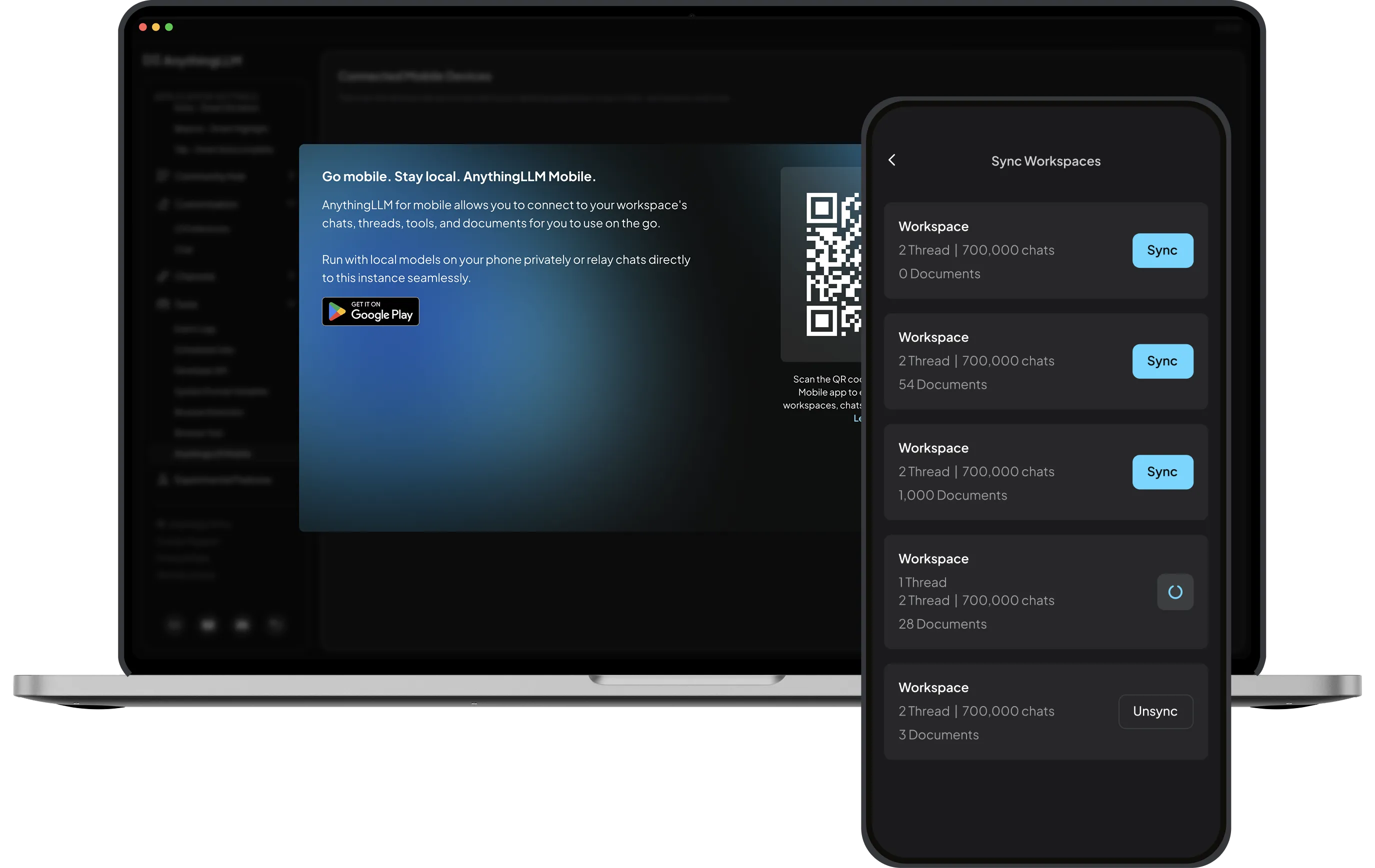
PocketPal is a single-device app. AnythingLLM Mobile is part of a bigger system. Scan a QR code in AnythingLLM Desktop or your self-hosted AnythingLLM server, and your phone imports your workspaces, threads, and chat history. Chats in those workspaces run against your desktop, with its bigger models and its full document library, and come back with citations.
When you want something bigger than your phone can run, you can also connect to 20 providers, including Ollama, LM Studio, OpenAI, Anthropic, Gemini, OpenRouter, and any OpenAI-compatible endpoint.
Models that fit your phone
AnythingLLM Mobile ships a curated list of models chosen to run well on phones, including Qwen 3.5 (0.8B, 2B, and 4B), Gemma 3 and Gemma 4, Llama 3.2 1B, Granite, LFM 2.5, and Qwen3-VL for vision. Every model shows a fit badge that compares its size to your phone's memory, so you know before you download whether it will run comfortably. You can also search Hugging Face for any GGUF, or tap "Use this model" on a Hugging Face page to send it straight to the app.
Where PocketPal is ahead
To be fair to PocketPal: it runs on iOS, it can read replies aloud with text to speech, it supports Snapdragon NPU acceleration, it has Pals and a community marketplace for them, and its benchmark leaderboard is genuinely useful. If those are what you want, it is a good app made by people who care about on-device AI.
On privacy, both apps keep on-device chats on your phone. AnythingLLM Mobile sends anonymous usage telemetry by default, which you can turn off in settings. Web search and cloud providers naturally send your query to that service.
Try it
Get AnythingLLM Mobile from Google Play or as a direct APK. Pick a model that fits your phone, add a document, and ask it something. No account required.
Frequently asked questions
›Is AnythingLLM Mobile available on iPhone?
Not yet. AnythingLLM Mobile is available for Android on Google Play and as a direct APK download. iOS support is planned.
›Can AnythingLLM Mobile run models offline?
Yes. It runs GGUF models on device with llama.cpp, from a curated list (Qwen 3.5, Gemma, Llama 3.2, Granite, LFM and more) or any GGUF you import from Hugging Face. Chat, document search, and vision work offline with on-device models. Web search naturally needs a connection.
›Can I chat with documents on my phone?
Yes. AnythingLLM Mobile parses PDF, Word, Excel, PowerPoint, CSV, Markdown, HTML and more, then embeds them on your phone with an on-device embedding model and reranker.
›Is AnythingLLM Mobile free?
Yes. There are no in-app purchases and no account required. Anonymous usage telemetry is on by default and can be turned off in settings.