
AnythingLLM vs LM Studio: the open-source LM Studio alternative
LM Studio is a great way to run a model. AnythingLLM is what you do with it: documents, agents, meetings, and dictation in one free, open-source app. And it can use LM Studio as its engine.
Updated October 2026LM Studio is one of the best ways to download and run a language model on your own computer. It has a polished model browser, fast llama.cpp and MLX engines, and a solid local API server. If all you want is to load a model and chat with it, it does that job well.
Most people do not stop there, though. Once a model is running, you want it to read your files, remember your projects, search the web, take actions, and fit into the rest of your day. That is where AnythingLLM comes in. It is a free, open-source desktop app that runs local models and then puts them to work. And if you already love LM Studio, you can keep it as the engine underneath.
Where AnythingLLM and LM Studio differ
| Feature | AnythingLLM | LM Studio |
|---|---|---|
| Open source | MIT-licensed core on GitHub | No. The app is proprietary; only the CLI and SDKs are MIT |
| Free for work | Yes | Yes, since July 2025 |
| Run local models | Built-in engine (llama.cpp), 59 curated models, any GGUF from Hugging Face | llama.cpp and MLX, with in-app Hugging Face search |
| Use other model providers | 40+ providers, including LM Studio itself | Local models; cloud models via the separate Bionic app |
| Document chat | Persistent workspaces with a vector database and citations | Attach files to a single chat |
| Data connectors | GitHub, GitLab, YouTube, Confluence, Obsidian, websites | No |
| MCP tools | Yes | Yes |
| No-code agent builder | Agent Flows | No |
| Scheduled background jobs | Yes | No |
| Meeting transcription and notes | On-device, with speaker labels | No |
| System-wide dictation and autocomplete | Magic Echo and Magic Tab | No |
| Mobile app | Android, syncs with desktop | iPhone via Locally AI and LM Link |
| Multi-user team server | Self-host with Docker, or hosted | No |
Open source, not just free
LM Studio is free, including for work. But the app is closed source, and its terms forbid attempts to reverse engineer or derive its source code. For a tool that reads your private files and sits next to your most sensitive conversations, a lot of people would rather be able to look inside.
AnythingLLM's codebase is MIT-licensed on GitHub, with more than 66,000 stars. You can audit it, build it, fork it, and run it inside a company without asking anyone. The desktop app is free for personal and commercial use, with no account required.
Workspaces, not one-off attachments
In LM Studio you attach documents to a chat message. That works for a quick question about one PDF. It does not work when you have a project folder, a contract library, or a year of research notes you want the model to know about every time.
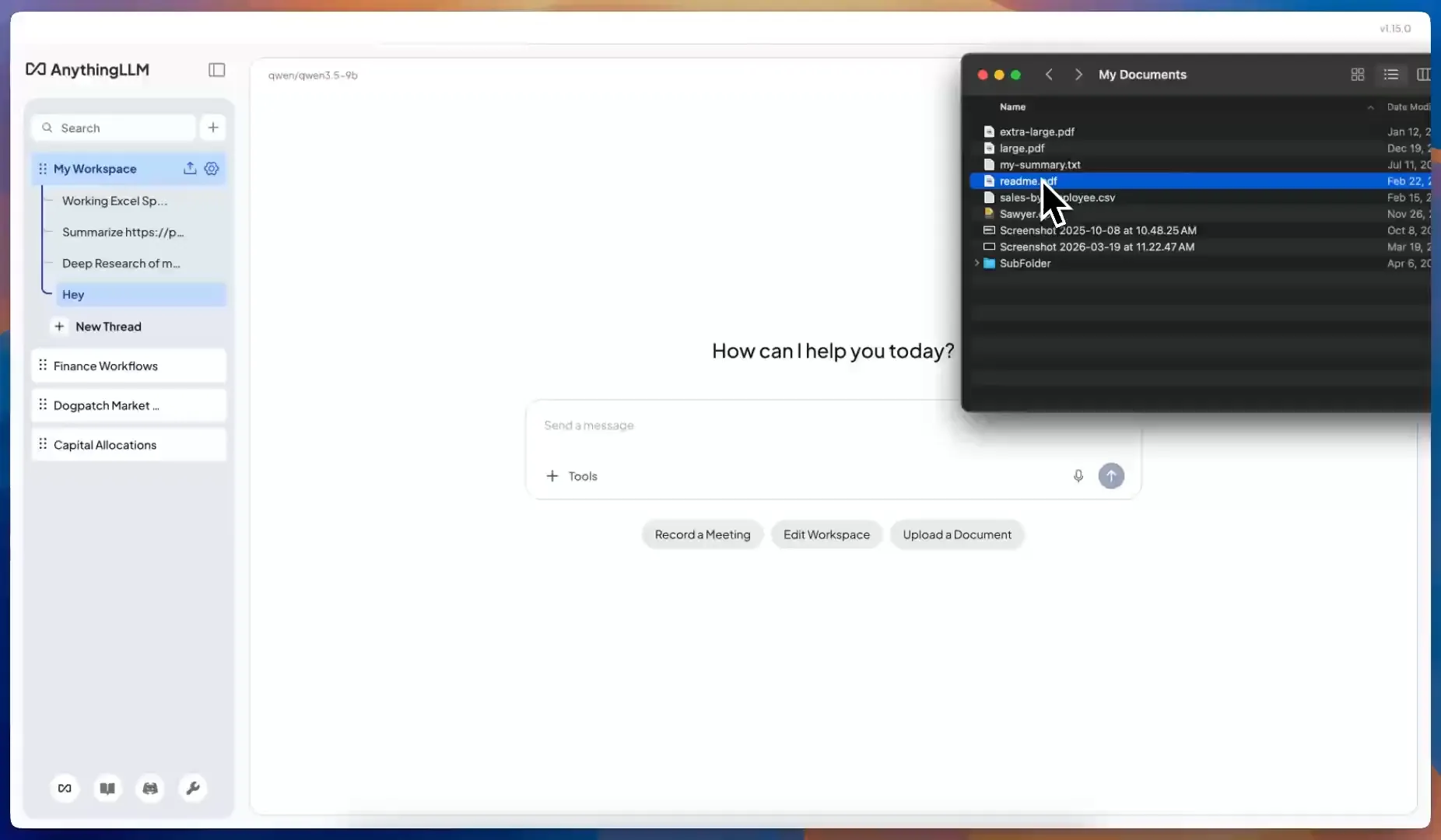
AnythingLLM is built around workspaces. Drop files or folders into a workspace and they are embedded into a local vector database on your machine. Every conversation in that workspace can search them, and every answer shows its sources. You can pin a critical document so it is always in context, and pull in content from GitHub, YouTube, Confluence, Obsidian vaults, and full website crawls. PDFs, Word, PowerPoint, Excel, EPUB, images through OCR, and even audio and video through transcription all work.
Agents that do things
LM Studio's chat app supports MCP servers, which is great. AnythingLLM supports MCP too, and adds a full agent layer around it:
- Built-in skills for web search (on by default, no API key), web scraping, file system access, charts, SQL databases, Gmail, Google Calendar, Outlook, and creating Word, PowerPoint, Excel, and PDF files.
- Agent Flows, a no-code builder for chaining API calls, web scrapes, file operations, and model instructions into your own tools.
- Scheduled jobs that run an agent on a schedule in the background. A morning brief, a weekly report, a daily check on a web page.
LM Studio's own agent features have moved into Bionic, a separate app that launched in July 2026. With AnythingLLM it is all one app and one set of documents.
The rest of your day
AnythingLLM also covers the parts of your workflow that are not a chat window:
- Meeting Assistant. Records any call without a bot, then transcribes, labels speakers, and summarizes it on your own computer.
- Magic Echo. Dictation in any app on your computer, cleaned up by your model as you speak.
- Magic Beacon and Magic Tab. Highlight text anywhere to ask, rewrite, or translate it, and get context-aware autocomplete in any text field.
- AnythingLLM Mobile for Android, which runs models on your phone and pairs with your desktop.
The Magic features are free with a daily allowance, and an optional Pro subscription removes the limits. Everything else in this article is free with no limits.
Use LM Studio inside AnythingLLM
You do not have to choose. If LM Studio is already your favorite way to run models, keep it:
- In LM Studio, load a model and start the local server.
- In AnythingLLM, open Settings → LLM Preference and choose LM Studio. AnythingLLM auto-detects the server and lists your models.
- Optionally, set LM Studio as your embedding provider too.
Now LM Studio does what it is great at, running models, and AnythingLLM gives those models your documents, tools, meetings, and memory. See the LM Studio setup guide for details.
If you would rather have one app, AnythingLLM's built-in engine runs models directly, with GPU acceleration on NVIDIA, AMD, and Apple Silicon, and NPU support on Windows through Microsoft Foundry Local.
When LM Studio is the better pick
If you mainly benchmark models, need MLX on a Mac, or want a dedicated model server with in-app Hugging Face search, LM Studio is excellent at that. Plenty of our users run it as the engine behind AnythingLLM for exactly those reasons.
If you want that model to know your documents, run tasks for you, and take notes in your meetings, download AnythingLLM. It is free and takes a few minutes to set up.
Frequently asked questions
›Is AnythingLLM a good alternative to LM Studio?
Yes, if you want more than a model runner. AnythingLLM runs local models with its built-in engine and adds persistent document workspaces, agents, MCP tools, scheduled jobs, and an on-device meeting assistant. If you only need to download and serve models, LM Studio is excellent at that, and AnythingLLM can use it as a backend.
›Can I use AnythingLLM and LM Studio together?
Yes. Start LM Studio's local server, choose LM Studio as the LLM provider in AnythingLLM, and AnythingLLM will auto-detect it and list your loaded models. LM Studio can also be your embedding provider.
›Is AnythingLLM free for commercial use?
Yes. AnythingLLM Desktop is free for personal and work use, and the core codebase is MIT-licensed. An optional Pro subscription removes the daily limits on the Magic Echo, Magic Beacon, and Magic Tab features.
›Is LM Studio open source?
No. LM Studio's CLI and SDKs are MIT-licensed, but the desktop app itself is proprietary, and its terms prohibit reverse engineering it.